HP DeskJet 2921 All In One Printer: Your Versatile Printing Solution
Our Product Insight
The HP DeskJet 2921 All In One Printer is designed to meet the diverse needs of home and small office users. With its ability to print, scan, and copy, this compact device is an all-in-one solution that simplifies your daily tasks. Whether you're printing documents for work, school projects, or cherished photos, this printer aims to deliver quality results without taking up too much space.One of the standout features of the DeskJet 2921 is its wireless connectivity. This allows you to print from virtually anywhere in your home or office, using your smartphone, tablet, or computer. The easy setup process means you can get started quickly without the hassle of tangled cords or complicated configurations.
Key Features
Wireless Printing
The wireless printing capability is a game-changer for those who value convenience. You can connect your printer to your Wi-Fi network and print directly from your mobile devices using the HP Smart app. This feature not only saves time but also enhances your productivity, allowing you to print documents on the go.Instant Ink Subscription
One of the most attractive offerings with the HP DeskJet 2921 is the 3 months free Instant Ink subscription. This service automatically orders ink for you when your printer detects that you're running low. This means you won’t have to worry about running out of ink in the middle of an important project. After the trial period, you can choose a plan that suits your printing habits, ensuring you always have ink when you need it.
Compact Design
The DeskJet 2921 boasts a compact design, making it ideal for small spaces. Whether you have a dedicated home office or a small corner in your living room, this printer fits seamlessly into your environment. Its sleek look also adds a modern touch to your workspace.
Print, Scan, and Copy
This all-in-one printer does more than just print. It also allows you to scan and copy documents, making it a versatile tool for both personal and professional use. The scanning feature is particularly useful for digitizing important documents or sharing information quickly.
Who It's For
The HP DeskJet 2921 is perfect for a variety of users: - Students: If you're a student, this printer can help you print assignments, study materials, and even photos for projects. Its wireless capabilities mean you can print from your laptop or smartphone without being tied to a desk. - Home Office Users: For those working from home, the DeskJet 2921 offers all the essential functions you need. You can print reports, scan important documents, and make copies of necessary paperwork without needing multiple devices. - Families: If you have kids, the ability to print photos and school projects can be a great asset. The Instant Ink subscription also ensures that you won’t have to make last-minute trips to the store for ink.Pros and Considerations
While the HP DeskJet 2921 has many appealing features, it’s important to consider both the pros and potential drawbacks:Pros:
- Easy Setup: The straightforward installation process makes it accessible for users of all tech levels. - Wireless Connectivity: Print from anywhere in your home, enhancing convenience. - Versatile Functions: Print, scan, and copy all in one device. - Instant Ink Subscription: Automatic ink delivery helps you avoid running out of supplies.Considerations:
- Print Speed: Some users may find the print speed to be slower compared to higher-end models, especially for larger documents.
- Photo Quality: While it performs well for documents, photo printing may not match the quality of dedicated photo printers.
In conclusion, the HP DeskJet 2921 All In One Printer is a versatile and user-friendly option for anyone looking to streamline their printing needs. With its wireless capabilities, compact design, and the added benefit of the Instant Ink subscription, it’s a solid choice for students, home office users, and families alike. Whether you’re printing reports or cherished family photos, this printer is equipped to handle it all with ease.
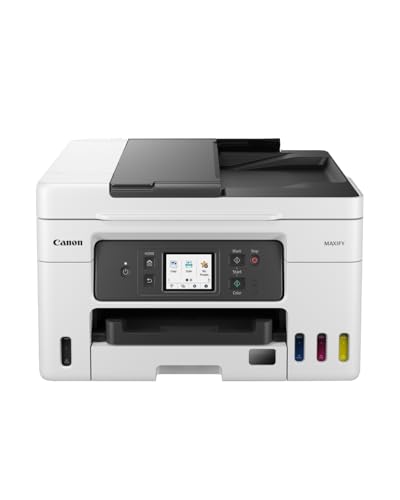
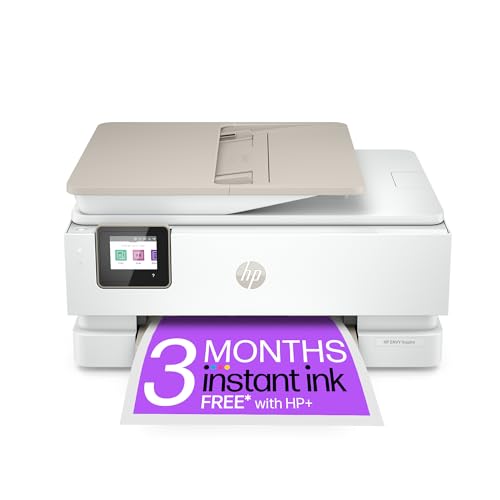
If you're looking for a reliable all-in-one solution, the HP OfficeJet Pro 8125e is perfect for high-volume printing and offers smart features for your office needs. For an eco-friendly option, consider the Canon MAXIFY GX4050, which features a MegaTank ink system to reduce printing costs significantly. The Canon PIXMA TS6550I is ideal for those who need Wi-Fi connectivity and a compact design, making it easy to print from your smartphone. If you want a stylish and efficient home printer, the HP Envy Inspire 7920e delivers vibrant color prints with wireless convenience. Lastly, the HP DeskJet 4220e is perfect for home use, providing seamless printing, scanning, and copying with the added benefit of 3 months of free Instant Ink. Check out the Canon MAXIFY GX4050 All-in-One Printer - Wireless, MegaTank Inkjet, A4 for great value. Check out the Canon PIXMA TS6550I - All-in-One Printer with Wi-Fi Connectivity & 1.42? OLED Display | Wireless for Easy Printing From Your Smart Phone PIXMA Print P for great value. Check out the HP Envy Inspire 7920e All-in-One Wireless Colour Printer, White for great value. Check out the HP DeskJet 4220e All in One Printer | Perfect for Home | Colour | Wireless | Print, Scan & Copy, ADF | 3 Months of free Instant Ink | Easy Setup & Rel for great value.
More Products You Might Like



Disclaimer: This article has been generated through our AI content insight system and is intended for general informational purposes only. Please carry out your own research and review product details directly before making any purchase decisions.