


Checkout with Confidence
Payment Security Guaranteed
Return with Ease
Fast & Hassle-Free Process
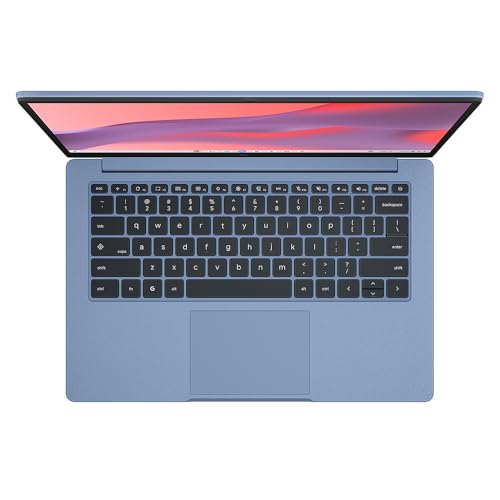
The ASUS Chromebook 14 is ideal for students and professionals seeking a lightweight, portable device for everyday tasks. With its 14-inch Full HD display, it provides a clear and vibrant viewing experience, perfect for browsing, streaming and productivity applications. The Intel Celeron N50 processor and 4GB RAM ensure smooth performance for basic computing needs, making it suitable for users who require a reliable, user-friendly laptop for web-based tasks and online learning. Its compact design and affordability further enhance its appeal for budget-conscious consumers.
This Chromebook is best suited for casual use, such as browsing the internet, streaming videos, and using cloud-based applications. Its 14-inch size makes it easily portable, fitting into backpacks without hassle. To maintain optimal performance, keep the device away from moisture and regularly update the software as prompted. The product typically includes a charger for convenient use.
ASUS 14" Full HD Chromebook, Intel Celeron N50, 4GB RAM, 64GB eMMC Storage
Key Takeaway
Experience seamless browsing and productivity with this 14-inch Full HD ASUS Chromebook, powered by an Intel Celeron N50 processor and equipped with 4GB of RAM and 64GB of eMMC storage, all for just £179.99. Ideal for students and casual users, this lightweight laptop offers fast performance and long battery life, making it perfect for online learning, streaming, and everyday tasks. Enjoy the convenience of a reliable device that keeps you connected wherever you go!
Frequently Asked Questions
What is ASUS Chromebook 14?
The ASUS Chromebook 14 is a lightweight laptop designed for productivity and entertainment. It features a 14-inch Full HD display and is powered by an Intel Celeron N50 processor.
How much does ASUS Chromebook 14 cost?
The price of the ASUS Chromebook 14 is £179.99. This affordable price point offers great value for users seeking a reliable device for everyday tasks.
What are the key features of ASUS Chromebook 14?
Key features of the ASUS Chromebook 14 include 4GB RAM, 64GB eMMC storage, and a long-lasting battery life. It also boasts a sleek design and fast boot-up times, making it ideal for on-the-go use.
Who is ASUS Chromebook 14 best for?
The ASUS Chromebook 14 is best suited for students, professionals, and casual users who need a portable device for web browsing, document editing, and streaming. Its user-friendly interface makes it ideal for those who prefer a simple computing experience.
How do I use/care for ASUS Chromebook 14?
To use the ASUS Chromebook 14, simply power it on and sign in with your Google account to access apps and services. For care, keep it clean by using a microfiber cloth and avoid exposing it to extreme temperatures or moisture.
Product Highlights
- ASUS Chromebook is made for boosting productivity and having more fun while on the move — all day, every day
- 14.0 Full HD 60Hz Screen
- 4GB RAM, paired with 64GB eMMC Storage
- Chromebooks run ChromeOS, the fast, secure operating system from Google. This device is built to run on this operating system for optimised performance and security. Simply sign in with your Google Account to get immediate access to built-in Google Workspace apps like Docs and Sheets.
- To use Microsoft 365, simply go to Microsoft365.com in your browser to create and edit Word, Excel, and PowerPoint files from the web. While desktop versions cannot be installed, this method provides full access. Note that a Microsoft 365 subscription is required for additional functionality.
Fast Delivery
Quick & reliable shipping
Secure Shopping
100% secure transactions
Great Prices
Competitive deals daily
Expert Support
Here to help you choose
More Products You Might Like from shopping
View All


Please Note: When you order through these links, we may earn a commission at no additional cost to you.